YOCOWOCO Bluetooth Wireless Audio Adapter Xbox Elite YO-BOX02 744759911667 5.2
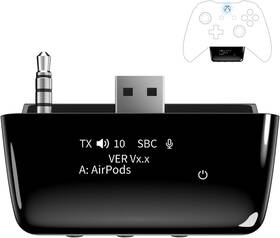
( Brand: Yocowoco ), ( Part Type: Adapter ), ( Unit Count: 1.0 Count ), ( Warranty Description: 24 Months ), ( Compatible Devices: Xbox Controller With 3.5mm Audio Jack, Bluetooth Headphones ), ( Mfr Part Number: Yo-box02-bk ), ( Item Dimensions: 2.18 X 0.67 X 0.67 Inches ), ( Smart Home Compatibility: Not Smart Home Compatible ), ( Warranty Type: Limited ), ( Connector Type: 12 Pin Interface, Auxiliary ), ( Item Weight: 0.57 Ounces ), ( Power Plug Type: No Plug ), ( Color: Black ), ( Specific Uses For Product: Headphones ), ( UPC: 744759911667 )
Review YOCOWOCO Bluetooth 5.2 Wireless Audio Adapter One Series Xs And Elite
The **Yocowoco 744759911667 Bluetooth 5.2 Wireless Audio Adapter** is a high-performance, next-generation accessory designed specifically to elevate the immersive audio experience of the Xbox Series X S Elite console. Engineered with cutting-edge Bluetooth 5.2 technology, this sleek and compact adapter ensures seamless, low-latency connectivity between your Xbox and a wide range of wireless headphones, speakers, or audio systems, eliminating the need for cumbersome cables while maintaining crystal-clear sound quality. Built to meet the demands of modern gaming and entertainment, the adapter features a robust and durable construction, ensuring long-term reliability even during extended gaming sessions. Its intuitive design includes a single, easy-to-use button for effortless pairing and quick connectivity, allowing users to switch between wired and wireless modes with minimal hassle. The adapter supports advanced Bluetooth profiles, including A2DP (Advanced Audio Distribution Profile) and AVRCP (Audio/Video Remote Control Profile), delivering high-fidelity audio with minimal interference, making it ideal for both competitive gamers and casual players alike. Whether you're engrossed in a cinematic adventure, enjoying a multiplayer match, or simply relaxing with high-definition audio, this adapter ensures that your sound experience is as rich and dynamic as the content you re consuming. Its compatibility with a vast array of Bluetooth-enabled devices from premium over-ear headsets to wireless earbuds and home theater systems makes it a versatile addition to any entertainment setup. With its compact form factor and professional-grade build, the Yocowoco Bluetooth 5.2 Wireless Audio Adapter seamlessly integrates into your gaming environment, providing the freedom to move without compromising on audio quality or performance.
The **Yocowoco Bluetooth 5.2 Wireless Audio Adapter** for the Xbox Series X S Elite is marketed as a solution for wireless headset connectivity, but it has several key advantages and drawbacks to consider before purchasing.
### **Pros:**1. **Bluetooth 5.2 Support** Offers improved range, stability, and lower latency compared to older Bluetooth versions, which can be beneficial for gaming.
2. **Compatibility with Xbox Series X S Elite** Designed specifically for the console, suggesting better integration than generic adapters.
3. **Potential for Wireless Headset Use** If you own a Bluetooth headset (e.g., Logitech G Pro X, SteelSeries Arctis Nova), this adapter could enable wireless audio without needing a wired headset.
4. **Compact & Portable** Smaller than some other adapters, making it easier to carry if needed for other devices.
5. **May Avoid Xbox s Official Wireless Headset Requirement** Xbox s official wireless headsets (like the **Xbox Wireless Headset**) are expensive, and this adapter could be a cheaper alternative for wireless audio.
### **Cons:**1. **No Official Xbox Certification** Unlike Xbox s **Xbox Wireless Headset** or **Xbox Audio Adapter**, this is a third-party device, meaning it may not receive official Xbox support or updates.
2. **Potential Latency Issues** While Bluetooth 5.2 reduces latency, gaming audio still relies on wired connections for the best experience. Wireless audio may introduce slight delays or dropouts.
3. **Limited Functionality** This adapter does **not** support **Xbox s proprietary wireless headset protocol** (used by Xbox s official wireless headsets), meaning it may not work with all Bluetooth headsets seamlessly.
4. **No Voice Chat Support** Xbox s official wireless headsets support **Xbox Live voice chat** via the console s microphone. This adapter likely does not, meaning you d still need a wired headset for voice communication.
5. **Possible Driver/Compatibility Issues** Third-party adapters can sometimes cause connectivity problems, especially if the Xbox console or headset requires specific firmware.
6. **No Built-in Microphone** If you want wireless audio **and** voice chat, you d still need a wired headset or a separate Bluetooth microphone.
7. **Marketplace & Reliability Concerns** Sold on platforms like Amazon or eBay, the quality and longevity may vary compared to official Xbox accessories.
### **Conclusion:**The **Yocowoco Bluetooth 5.2 Adapter** could be a **budget-friendly option** if you already own a **Bluetooth headset** and want wireless audio on your Xbox Series X S Elite. However, it **lacks official Xbox support**, may introduce minor latency, and **does not fully replace** the need for a wired headset for voice chat.
If your primary goal is **wireless audio only** and you re okay with potential minor drawbacks, this adapter might work. But if you need **low-latency gaming audio, voice chat, or official Xbox compatibility**, investing in **Xbox s official wireless headset** or a **wired headset with a Bluetooth adapter** (like the **Xbox Audio Adapter**) would be a more reliable choice.
### **Recommendation:**- **If you need wireless audio and already have a compatible Bluetooth headset** The **Yocowoco adapter** could be a **cheap alternative**, but test it thoroughly for stability.
- **If you need voice chat or the best gaming audio experience** Stick with **Xbox s official wireless headset** or a **wired headset with a proper adapter**.
- **If you want a more universal solution** Consider a **USB-C Bluetooth dongle** (like the **Xbox Audio Adapter**) that works with wired headsets while allowing Bluetooth connectivity for other devices.
For most gamers, the **official Xbox wireless headset** remains the best option, but the **Yocowoco adapter** could be a **low-risk, low-cost experiment** if you re flexible on functionality.
Details:
To achieve apt low latency, your headphones must also support Low Latency apt-LL technology. Simply long press the ' and '-' buttons for three seconds to enter pairing mode. Then, adjust the Headset chat mixer for a better balance between game and audio.$10.96 $ 10.
It can intuitively display volume, codex format, mic status, and paired Bluetooth devices. The display keep showing 'Waiting. The adapter is designed for Xbox One, Series X,, and Elite 2 Wireless Controllers with 3.5mm audio jack. Before any operation, this is a normal phenomenon.
The adapters volume buttons serve as a secondary option. OLED Display and Effortless Device Information Access The screen simplifies pairing the Microsoft Xbox wireless adapter with all Bluetooth headphones, earbuds. Regular Bluetooth headsets might not match the sound of gaming-specific wired ones. It further conserves power by automatically dimming the screen after 10 seconds of inactivity.
Please Go to 'Audio Settings' on your Xbox console. You'll need to use the adapters built-in mic for chat. This indicates that the adapter is in standby mode, waiting for user to perform next action. Note Even after the transmitter is powered off, mic remains active when mute switch leftward.
The mic can function independently without paired headphones. Sliding it right activates the mute indicator light, disabling mic. Wide Compatibility The Xbox audio adapter is designed for One, Series X,, and Elite 2 Wireless Controllers with 3.5mm jack. Volume Adjustment If the volume is relatively low, please primarily adjust through your Xbox console.
With the same headset, some audio quality loss when converting from analog to Bluetooth is normal. The flashing indicator light will continue to remind users that the adapter is operational. Check the codex and latency rate before buying. We kindly ask you to adjust according the steps in image above.
Low latency requires your headphones to also support this technology.
specifications gamecableadapter:
- brand: Yocowoco
- part type: Adapter
- unit count: 1.0 Count
- warranty description: 24 Months
- compatible devices: Xbox Controller With 3.5mm Audio Jack, Bluetooth Headphones
- mfr part number: Yo-box02-bk
- item dimensions: 2.18 X 0.67 X 0.67 Inches
- smart home compatibility: Not Smart Home Compatible
- warranty type: Limited
- connector type: 12 Pin Interface, Auxiliary
- item weight: 0.57 Ounces
- power plug type: No Plug
- color: Black
- specific uses for product: Headphones
- upc: 744759911667
returns gamecableadapter:
- method: Money back
- paid by: Seller
- time: 30 Days
- policy: Returns Accepted
offer gamecableadapter:
- options: Ship-to-home
- started: June 8, 2026
- sold: 0
- availability: In Stock
- quantity: 1
seller gamecableadapter:
- rating: 100.0%
- city: Denver, Colorado
- # reviews: 1
general gamecableadapter:
- condition: New
- Video Games Consoles > Video Game Accessories > Cables Adapters
payments gamecableadapter:
- credit card: Mastercard
- other
- wallet: Google-pay
shipping gamecableadapter:
- class: Standard
- cost: $0.00
- transit: 4-8 Days
- service: Standard
- type: Fixed
Yocowoco YO-BOX02 Is Similar To:
- Yocowoco X004ede7kt Wireless Audio Transmitter For Xbox Controller Oled Mic Low Latency (55.7% similar) Yocowoco wireless audio transmitter for xbox controller, OLED, mic, low latency...(March 7th, 2026)
